Tool · free · in your browser
3D text & QR
Type a name and take it home as a printable keychain, plate or sign; or turn a link or your WiFi into a physical QR code. Eight fonts, relief or engraving, real millimetre sizing and unlimited downloads, no sign-up — everything is generated in your browser.
Parts generated
Single-colour printer? Swap filament right after the layer that ends at 3.0 mm: that's where the letters start.
Several names at once
One per line, up to 60. Each gets the same settings, all in one ZIP.
How it works
- 1 Pick what you want: keychain, plate, free text or a QR (link, text or WiFi).
- 2 Type your text (and a second line if you like), pick a font or upload your own, an icon and the base shape, and tune size, relief or engraving. The part regenerates live as you type.
- 3 Download the STL (or OBJ, 3MF, PLY). For two colours, the 3MF has the base and the letters already in place; with a list of names, they all come in one ZIP.
The four modes, made with the tool
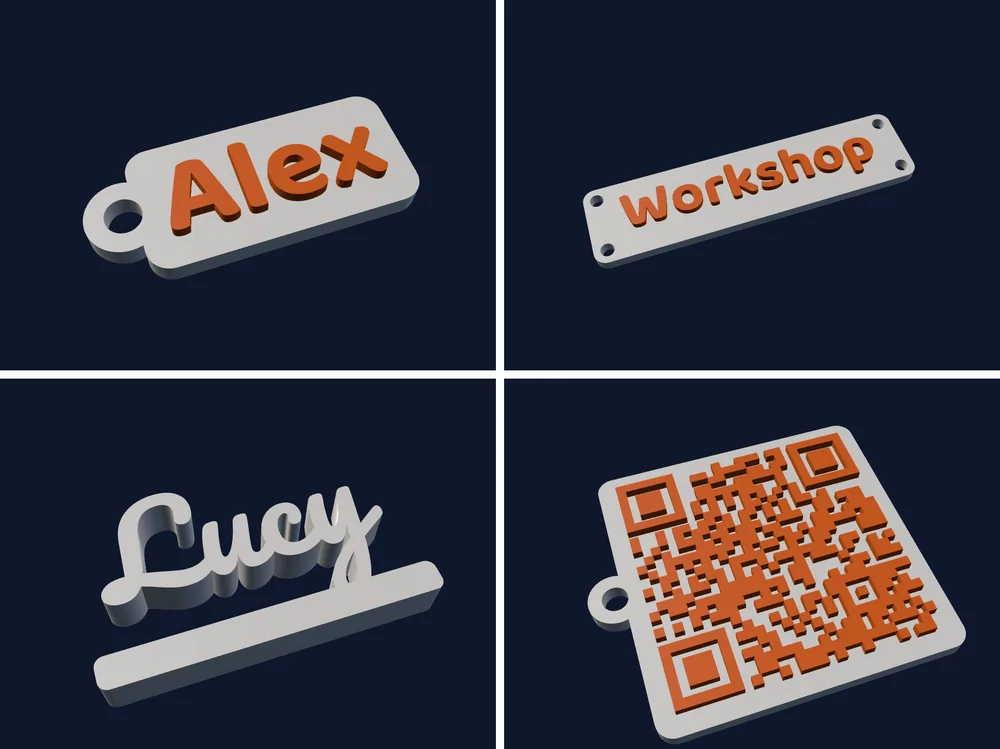
- Keychain. A rounded base, or one shaped like the letters, with the text on top (one or two lines, plus an icon if you like) and a loop on the left.
- Plate. The same without the loop, with optional four holes to screw it to a door, a box or a piece of furniture.
- Free text. Just the letters, no base, to glue onto another part or stand upright. The connecting bar holds them together.
- QR. A code holding a link, some text or your Wi-Fi details on a plate, with an optional loop.
The dimensions the tool sets for you
The sliders control text height (8-40 mm), relief (0.6-4 mm), base (1.6-6 mm) and QR side (25-90 mm). Everything else is fixed by the tool, and it's worth knowing if you're designing something around the part:
| Dimension | Value |
|---|---|
| Margin from text to base edge | 3.5 mm on each side (also on the outline base) |
| Second line | Centred under the first, 25% of the text height apart |
| Icon | Left of the text, as tall as the block of text and at most 1.4 times the text height |
| Corner radius | 3 mm |
| Minimum base height | 16 mm for keychains, 20 mm for plates |
| Keychain loop | 9.2 mm disc with a 4.5 mm hole (2.35 mm wall) |
| Plate holes | Four 3.2 mm holes, 3.2 mm from the edges; the plate grows 10 mm wider |
| Connecting bar (free text) | Text width + 4 mm; 18% of the text height, at least 3 mm |
| Floor under engraving | At least 0.6 mm: an engraving never goes through the base |
3.2 mm holes are the usual clearance for M3 screws. The loop hole is sized for ordinary split key rings. The loop is sunk into the base instead of stuck to its edge, so the neck is thick and doesn't snap there in your pocket.
One detail that catches people out: text height is the font size, not the height of the letters. At 14 mm, a capital H measures 8.7 mm in Baloo 2 (the default font) and 9.8 mm in Montserrat. If your letters must be an exact size, scale the setting up by that ratio and check the final size shown under the viewer.
How it builds the part
- It reads the outline of each letter from the chosen font. All eight fonts are freely licensed (SIL OFL) and served from hotend, so nothing is fetched from elsewhere. If you upload your own, it's read in your browser and never leaves it either.
- It turns curves into polygons, eight segments per curve: enough that a 10 mm “o” doesn't print as a polygon.
- It merges every shape into one outline. The holes in letters like “o” or “a” are kept, and script letters that overlap fuse together instead of leaving double walls inside.
- It extrudes and combines the outline with the base through boolean operations in Manifold, a geometry library that guarantees a closed solid. The STL won't trigger your slicer's “mesh not watertight” warning.
With the two-colour option and the 3MF format, the download is a single file holding one object made of two parts, the base and the relief, already in place: Bambu Studio, for example, opens it as one piece with two parts, and you can give each its own filament, either with a multicolour system or with a manual filament change at the height where the relief starts. As STL, OBJ or PLY you get two files that share coordinates; imported together as a single multi-part object, they line up on their own.
Fonts and loose pieces
In keychain, plate and QR modes everything is held together by the base. In free text it isn't: the dot of an “i” or an accent can end up as separate pieces that get lost when you pull the print off the bed. There are two fixes, and the tool warns you if it finds loose pieces:
- The connecting bar, on by default: a strip under the letters that holds them all.
- A script font: Pacifico and Lobster join their letters. Even so, dots and accents stay separate in almost every font, so with text that has them the bar is still the safest choice.
The QR: minimum size for what it holds
The code uses error correction level M, which lets it be read even if around 15% of its modules (the little squares) are lost. The longer the content, the more modules the code has and the smaller each one is at the same size. The tool warns you when a module drops below 0.8 mm:
| Content | Modules | Module at 45 mm | Smallest side for 0.8 mm |
|---|---|---|---|
| Short link (hotend.es, 17 characters) | 25 × 25 | 1.8 mm | 20 mm |
| Typical Wi-Fi (42 characters) | 29 × 29 | 1.55 mm | 23 mm |
| Long link (53 characters) | 33 × 33 | 1.36 mm | 26 mm |
The smallest side the tool allows is 25 mm, so only long contents can trigger the warning. What matters most for a phone to read it first time is the contrast between code and base; that's covered in how to 3D print a Wi-Fi QR code. For the keychain, see how to make a name keychain.
What it's for
The name keychain is the classic 3D-printed gift: fast, cheap and personal. This tool also makes door and workshop plates (with screw holes), cake toppers and signs, and physical QR codes — your home WiFi framed by the door, your MakerWorld profile on a keyring. Every part comes out guaranteed watertight and, for two colours, as two files that fit together. For a photo gift, see the lithophane generator; and if your part is huge, the STL cutter splits it for your bed.
FAQ
- Is it really free? How many downloads do I get?
- Unlimited: every font and every download, no account. The part is generated in your browser, so there's no server to pay for and no queue to wait in.
- How do I print the text in a second colour?
- Tick “Two colours (letters apart)”. As 3MF you get a single file with the base and the letters as two parts of one object, already in place: your slicer opens them together and you give each its own filament. As STL, OBJ or PLY you get two files that share coordinates. On a single-colour printer, swap filament right after the layer that ends at the base height.
- Can I make many keychains at once?
- Yes: under “Several names at once”, type one per line, up to 60, and you get a ZIP with one file per name, all with the same settings. Handy for a class, a wedding or a birthday.
- Does the printed QR actually scan?
- Yes, as long as the modules (the little squares) don't get too small — the tool warns you if you should enlarge the QR or shorten the content. You provide the contrast when printing: relief in one colour on a light base scans beautifully.
- Can I use accents and special characters?
- Yes: the eight bundled fonts cover Western European languages (á, é, ñ, ü…) and common symbols. If you want another, you can upload your own TTF or OTF. In “free text” mode remember dots and accents are separate islands: enable the connecting bar or use a script font.
- Which format should I download, and will it print?
- STL by default (also OBJ, 3MF and PLY). The mesh is built with guaranteed-manifold booleans, so it's watertight — your slicer won't complain. Print the part flat on the bed, no supports needed.