Tool · free · in your browser
3D voronoi generator
Turn any model (STL, OBJ, 3MF, PLY) into an organic, print-ready lattice. Control cell size and thickness in millimetres, and paint the areas that must stay solid. Everything in your browser: your file is never uploaded to any server.
Voronoi lattices generated
How it works
- 1 Drag in your 3D model (STL, OBJ, 3MF or PLY).
- 2 Pick a starting point (vase, lamp or figure) and tune cell, strut and shell. The base and the top rim come out solid on their own; optionally paint other areas that must stay solid (a thread, a logo).
- 3 Hit “Generate voronoi”, compare before/after, and download your printable mesh.
What you get: the sample vase
The “try it now with a sample model” link builds a 59 × 90 × 59 mm vase with 24,320 triangles and applies the voronoi with 12.9 mm cells, 2.1 mm struts, a 1.6 mm shell, 60% smoothness, balanced quality and a solid base and top rim. These screenshots come from that run:
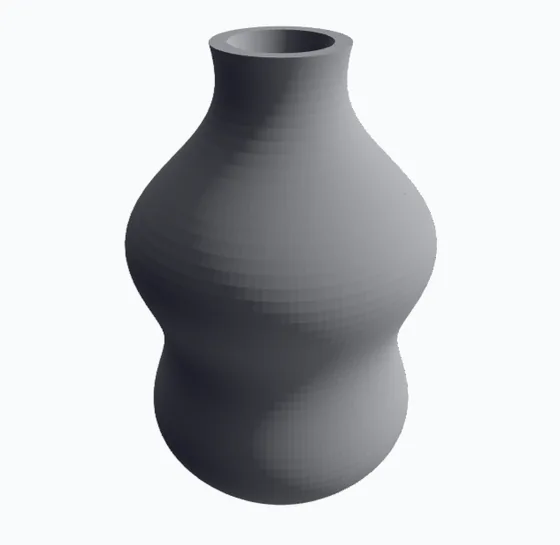
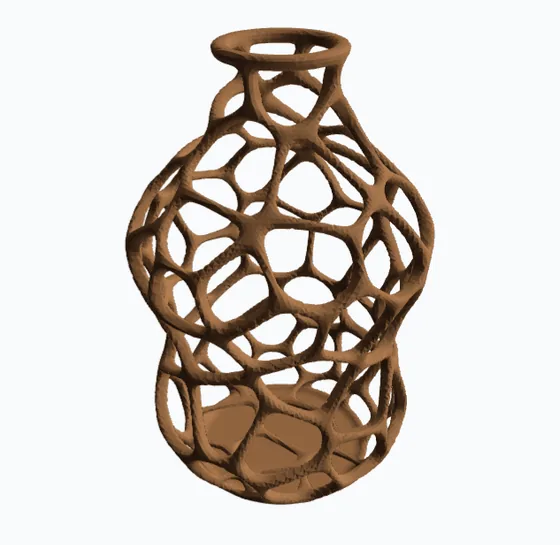
What it does to your model, under the hood
It doesn't cut holes into the original mesh, which is what usually breaks hand-made voronois. It rebuilds the whole part from a volume, in six steps:
- It voxelizes the model. The part goes into a 3D grid of 110, 150 or 200 cells along its longest side, depending on quality, and each cell gets its distance to the surface and whether it's inside or outside.
- It scatters seed points over the surface, at random but in proportion to area, and never closer to each other than 0.85 times the cell size. Each seed becomes the centre of a hole.
- It draws the struts wherever a point is almost equally far from its two nearest seeds: that's the border between two Voronoi cells. With “Thicker junctions” on, the spots where three cells meet get 40% thicker than the strut.
- It limits everything to a shell as deep as the shell thickness. If your model is closed, the shell grows inward, so the outside dimensions don't change; if it has holes, it grows on both sides of the surface. Painted zones go back to solid shell, and so do the model's bottom and top 3 mm if “Solid base” and “Solid top rim” stay ticked. Up is the Z axis, as in slicers.
- It smooths and cleans up. It blurs the volume to round the joints and drops any loose bits that don't touch the main part, except those inside protected zones.
- It turns it back into a mesh with marching cubes. The result is a closed solid even if the input mesh had holes or stray faces.
The seeds come from a random generator with a fixed seed, so the same settings always give the same lattice. If a strut lands right where you don't want it, move the cell size by a millimetre and you'll get a different layout.
Cell size is the big one
It's the setting that changes the look, the weight and the print time the most. Same vase, everything else unchanged:
| Cell size | Triangles | Material saved | STL |
|---|---|---|---|
| 8 mm | 147,896 | 62% | 7.4 MB |
| 12.9 mm (sample) | 96,576 | 78% | 4.8 MB |
| 20 mm | 68,456 | 84% | 3.4 MB |
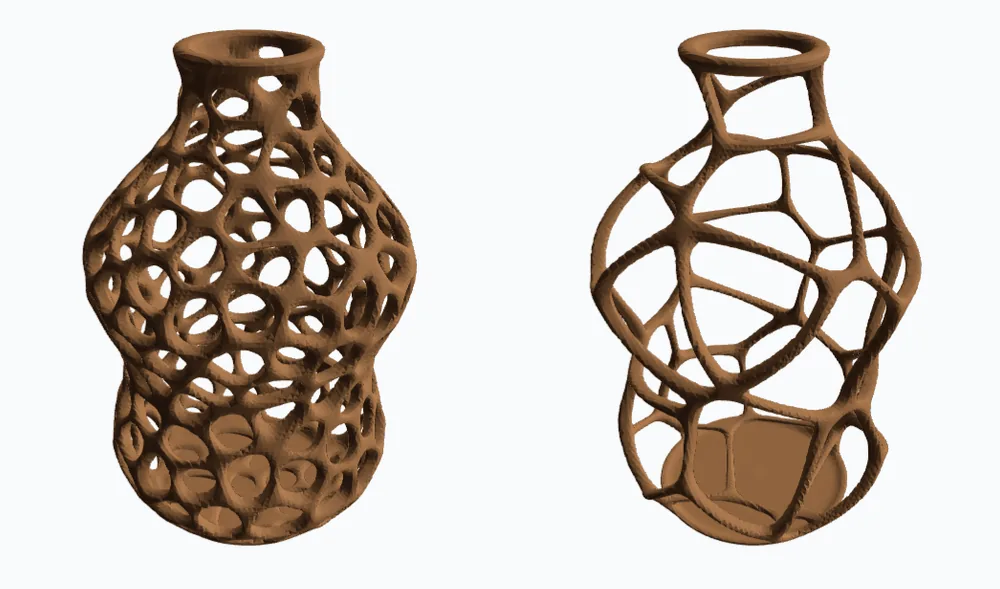
With 20 mm cells on a 59 mm wide part there are only a few cells per side and the vase loses its silhouette. As a rule of thumb, keep the cell under a fifth of the narrowest width you want to stay recognisable. The tool won't go past a third of the longest side: with bigger cells there would be no borders left to draw.
Which quality to pick
Quality sets the voxel size, and the voxel puts a floor under the struts: none can be thinner than 2.5 voxels, or it couldn't be rebuilt. If you ask for less, the tool thickens it on its own. For a part whose longest side is 10 cm:
| Quality | Voxel | Thinnest strut | Sample vase (13 mm cells) |
|---|---|---|---|
| Fast | ~1 mm | ~2.5 mm | 44,776 triangles, 2.2 MB |
| Balanced | ~0.75 mm | ~1.9 mm | 95,984 triangles, 4.8 MB |
| Fine | ~0.55 mm | ~1.4 mm | 190,288 triangles, 9.5 MB |
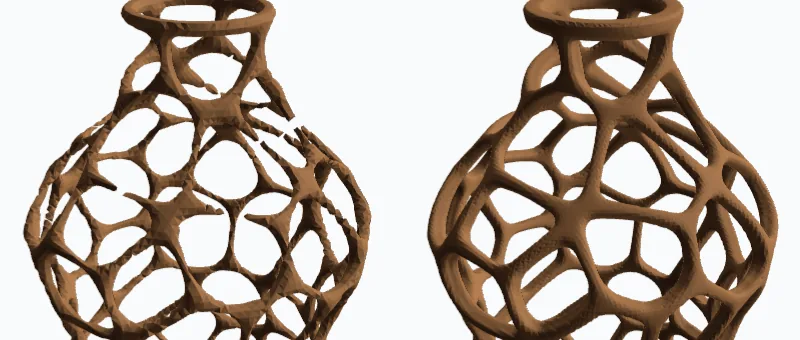
The voxel grows with the part: on a 20 cm part, balanced quality won't go below about 3.5 mm struts. If you want thin struts on a big part, use “Fine”. And as the screenshot shows, “Fast” leaves uneven, flattened struts: it's fine for trying out cell sizes, but for printing use “Balanced” or “Fine”.
The other settings, briefly
- Strut thickness (0.8-6 mm). For FDM, keep it at two line widths or more: 0.8 mm with a 0.4 nozzle. At 1 mm or less, the tool warns you.
- Shell thickness (0.8-5 mm). How deep the struts go into the part. More shell means more stiffness and more material.
- Smoothness. It does two things: it rounds the joints gradually and, from 25% up, blurs the volume (one pass up to 70%, two from 75%). That's why the step from 70 to 75% looks bigger than anywhere else on the slider.
- Solid base and rim. Ticked by default: they keep the bottom 3 mm solid, so the part sits flat on the bed, and the top 3 mm, so an open rim ends in a ring instead of loose struts.
- Starting point. “Vase”, “Lamp” and “Figure” set cell, strut, shell and bands to your model's size. You can fine-tune them afterwards.
- Protect zones. Paint what must stay solid onto the model: a thread, a logo, a fitting. The painted area blends into the lattice instead of being cut off sharply.
How to move over from Meshmixer and the usual mistakes when printing a lattice are in the guide a Meshmixer alternative for voronoi.
What it's for
The voronoi style is a 3D-printing classic: lamps that cast gorgeous shadows, lightweight planters, ventilated cases, decor… Until now the go-to was Meshmixer (discontinued) or wrestling with Blender; here you do it in the browser with real millimetre control and an always printable result (watertight, no floating fragments, guaranteed minimum thickness). If you just want a lighter file without changing the shape, use the mesh reducer.
FAQ
- What is the voronoi effect?
- A pattern of organic cells (think dragonfly wings or an irregular honeycomb) that turns a solid object into an open lattice. In 3D printing it's a classic for lamps, planters, cases and decor: far less material and a spectacular look.
- Is my file uploaded to a server?
- No. Everything is computed in your browser, on your device. That's also why there's no file-size limit — it only depends on your machine's memory.
- Is the result printable?
- Yes. The output mesh is watertight by construction, floating fragments are removed automatically and the minimum strut thickness is guaranteed in real millimetres. For FDM we recommend struts of at least 0.8 mm (two passes of a 0.4 nozzle).
- Can I keep parts of the model untouched?
- Yes — that's the point: paint the zones that must stay solid (a lamp base, a thread, some text) right on the 3D model and the voronoi pattern will respect exactly those areas.
- How is this different from Meshmixer?
- Meshmixer (the classic “Make Pattern → Dual Edges”) has been discontinued for years and was desktop software. This runs in the browser, needs no install, also reads 3MF, and adds something Meshmixer never had: paintable protected zones.
- Which formats does it read and write?
- It reads STL, OBJ, 3MF and PLY, and downloads the result in any of those formats.