Guide · 3D tools
How to compare 3D printers with data (and the specs that actually matter)
Every product page says the same thing: blazing fast, precise, "AI-powered". To choose well you need to put the numbers side by side and know which ones matter for your case. This guide covers the specs that genuinely change what you can print, the ones that are marketing noise, and how to line them up with hotend's comparator, free and with no sign-up.
Your use case first, the table second
There's no such thing as "the best 3D printer" — only the best one for what you print. Before looking at a single figure, decide what you'll do with it, because each use points at different specs:
- Big parts or batch printing → real build volume.
- ABS, ASA, car or outdoor parts → max temperatures and an enclosure.
- Flexibles (TPU) → direct drive extruder.
- Multicolor figures and parts → AMS compatibility and slot count.
- The printer will live in your living room → noise and power draw.
The specs that matter, one by one
Build volume: the real one, in millimetres
"Large format" means nothing; 256 × 256 × 256 mm does. Compare all three axes (X, Y, Z) against the biggest thing you actually print: most household parts fit comfortably in 220 mm, and paying for volume you never use also means a bigger machine, more desk space and more power. Watch for the reverse trick too: some models advertise the volume "with an accessory", or lose Z height with certain toolheads.
Max nozzle and bed temperatures
For PLA and PETG almost any modern printer will do. Technical materials change the game: ABS and ASA want a bed around 100 °C, and nylon or polycarbonate ask for 300 °C nozzles. Check the nozzle material as well: carbon-fibre filaments need hardened steel, not brass. If you're not even sure which material you need, start with PLA vs PETG vs ABS.
Enclosed or open?
An enclosure isn't cosmetic: it keeps warm air around the part and prevents ABS and ASA warping. If you'll only print PLA and PETG, an open printer is cheaper and plenty; if you want technical materials, go enclosed (with a heated chamber, even better). In the comparator it's just another row in the table, so you see at a glance who has it.
Direct drive or bowden
With a direct drive extruder the motor pushes the filament right above the nozzle: short retractions and drama-free flexibles (TPU). With bowden the motor stays on the frame and the toolhead is lighter, but flexibles suffer. Nearly everything modern is direct drive — still, check the "drive type" row if TPU is in your plans.
Advertised speed vs real speed
The number on the box (600 mm/s!) is peak speed under ideal conditions. Sustained speed is ruled by the hotend's flow rate (mm³/s): at a 0.2 mm layer and 0.42 mm line width, holding 300 mm/s takes about 25 mm³/s of molten plastic — more than many hotends deliver. Acceleration (mm/s²) decides how much of that speed survives on parts with corners. That's why the comparator shows the three rows together — and why a CoreXY usually sustains more speed than a bed slinger, as we explain in CoreXY vs bed slinger.
Multicolor and AMS
If you want several colours or materials, check whether it takes a multi-spool system, which type, and how many slots. Keep in mind multicolor wastes material on every change (the purge); we cover how much and whether it's worth it in what is AMS.
Noise and power draw
A 45 dB printer can share a room with you; a 60 dB one can't. And power draw (W) matters if you print long hours — it shows up on the bill, especially with big heated beds. You'll find the cost-per-print formula in how much electricity a 3D printer uses. On both rows, the comparator highlights the lowest value as best.
What you can (almost always) ignore
- The speed on the box: without flow rate and acceleration next to it, it's just a pretty number.
- "Resolution down to 0.05 mm": nearly every modern FDM printer claims it; real quality at normal layer heights depends on the mechanics, not on that theoretical minimum.
- "AI-powered": usually a camera that spots spaghetti. Useful, but it doesn't decide a purchase.
- Bigger touchscreens, RGB lights, apps with a social feed: nice, irrelevant to print quality.
How to compare side by side in the comparator
With hotend's printer comparator:
- Hit "+" and search by brand or model. Add as many as you want: there's no column limit (two to four reads best).
- Work through the table by blocks: geometry, speed, hotend, bed, multimaterial, connectivity, calibration, software, noise and power.
- The best value in each row is highlighted in green with a trophy. On ties nobody gets marked — picking "the first one" would be lying to you.
- Drag the cards by their handle to reorder the columns, on touch or with a mouse.
- Share or save: the URL carries your selection (
?ids=), the Share button copies the link, and you can export the table as an image (PNG, WebP or JPG, solid or transparent background) to drop into a forum or group chat.
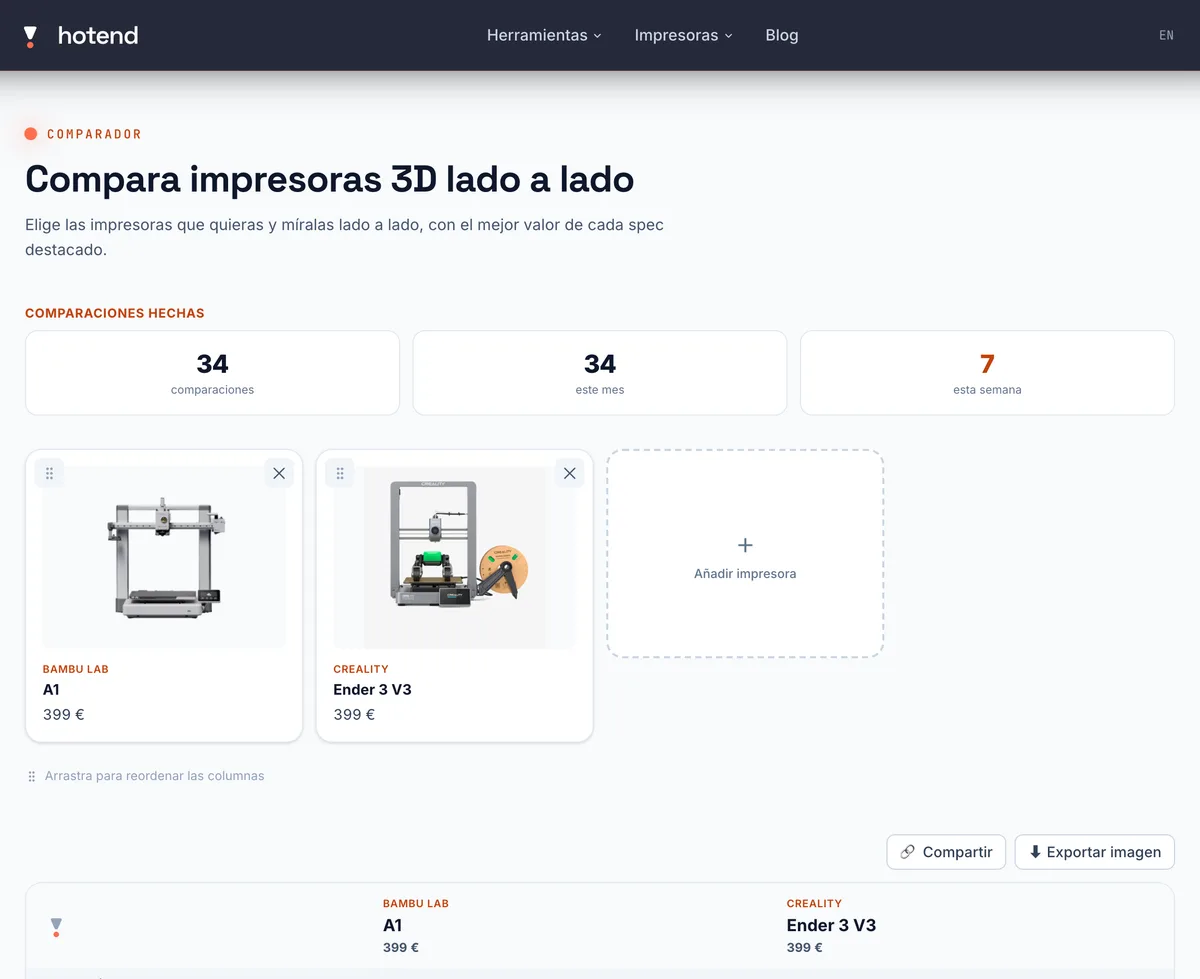
Every model in the table links to its page in the catalogue, with full specs and cited sources. And like the rest of hotend's tools, everything runs in your browser: no account, nothing uploaded — the selection lives in the URL and the image is generated on your machine.
No candidates yet?
If you don't know which models to put in the table yet, start with the best 3D printer for beginners guide by budget and use, or filter the catalogue by what matters to you (enclosed, AMS, volume…) and send the finalists to the comparator.
Frequently asked questions
- How many printers can I compare at once?
- As many as you want: the comparator has no column limit. In practice two to four is comfortable to read; with more, the table scrolls horizontally (swipe on mobile).
- What does the value highlighted in green mean?
- It's the best value in that row among the printers you picked: more volume, speed or temperature, or less noise, power draw and price. On a tie nobody is marked — flagging "the first in the list" would be misleading.
- Is the advertised top speed the real speed?
- Almost never. Sustained speed depends on the hotend's flow rate (mm³/s) and on acceleration, not on the marketing peak. That's why the comparator shows all three figures: a "600 mm/s" printer with a weak flow rate prints slower than a more modest one with good flow.
- How do I share a comparison?
- Your selection travels in the URL (?ids=), so copying the link is enough — the Share button does it for you. You can also export the table as an image in PNG, WebP or JPG, with a white or transparent background, ready for a forum or a group chat.
- Do I need an account, or is anything stored?
- No. There's no sign-up, your selection lives in your browser's URL, and the exported image is generated locally on your machine. Each printer's data comes from its catalogue page, with sources cited.
Sources
- hotend 3D printer comparator
- hotend printer catalogue (specs with sources cited on every page)
- Guide: best 3D printer for beginners
- What is AMS and multicolor printing
- How much electricity does a 3D printer use?